You can screen record all DRM content on any site with this software:
You must be registered for see links
It's opensource and free to use.
It doesn't record DRM out of the box, and their forum won't help if you ask. They actually say it can't do it, but there is a way.
I only know how to get it working on Windows 11, but most systems should work if you follow these steps.
(It wouldn't work for me in Firefox,, probably one of my extensions interfering, but Chrome had no issues)
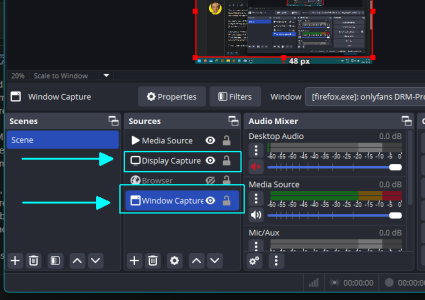
Once you've installed, go to the sources tab and add "Window Capture" and "Display Capture".
Window capture will record everything in your browser, and display records full screen.
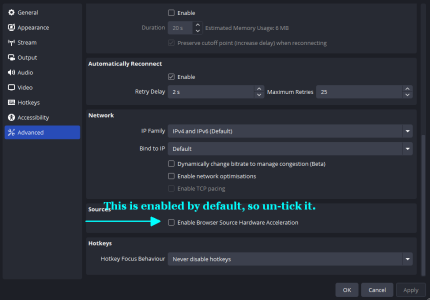
This is the important bit, you need to
disable hardware acceleration in both the program settings and in Chrome. If you don't, it will just record a black screen where the DRM is being played.
The program itself has got a lot of features, so can be a bit of a learning curve, but for basic recording it works great.