The original MPEGs were all downloaded from Usenet, so quality varies.
They have to be converted to MP4 to view as online streams, so I deinterlace to avoid those wavy artifacts you sometimes see on places like YouTube. That happens when interlaced videos are re-rendered to a progressive format without adjusting for the separate fields.
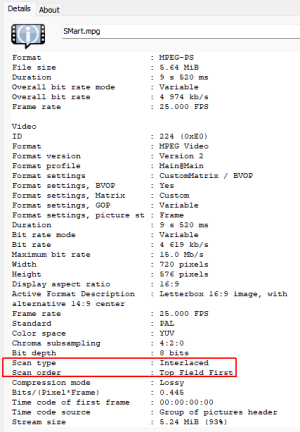

I use VirtualDub2 to do this. It's an ancient programme that hasn't been updated by the developer for years, but it's such an easy tool to use that there's a big community who support it.
The output quality depends on which deinterlace algorithm you use (and original quality obviously), and how much time you want to spend perfecting the output. In VirtualDub you can check and adjust every field in every video if you want, or you can be brutal and go for one of the faster plugin options.
I usually go for the latter if the output looks reasonable. I avoid YADIF because it tends to look too blurry, as does blending, so I generally go for discarding a field which looks slightly better and removes artifacts.
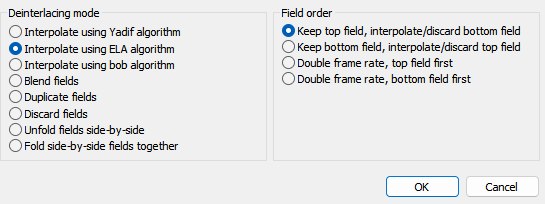
Finally I crop any black borders after it's resized. Null transform (in the third filter below), is an empty filter that lets you precision crop. I use the x264 plugin to slow render to an MP4.
This is what the preview looks like. You can see the difference in the output (right side).
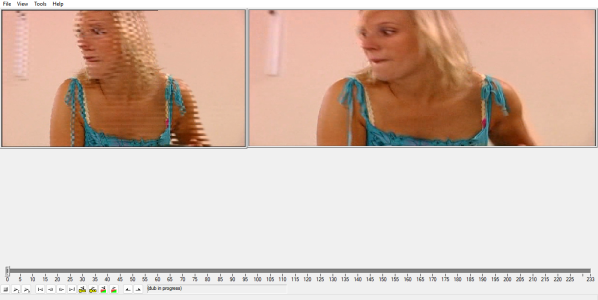
It's stretched because the recording was captured at 4:3 and I used the resize filter to output to 16:9 (middle filter in this shot).
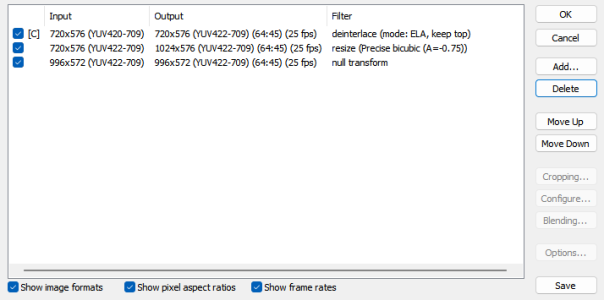
VDub reads the metadata and automatically adjusts the preview to 16:9, but it doesn't transfer that ratio, so the final video renders at 4:3.
Adding a resize means the preview gets stretched twice, which is unavoidable, but it doesn't affect the final video.
The end.